Documentation that maintains itself: How Suki keeps developer docs accurate for partners and coding agents
November 10, 2026
The developer documentation at Suki has grown into something much closer to a product than a set of pages. It is one of the most sophisticated documentation experiences in the healthcare AI space. Behind the pages partners read lies a complete platform: release notes, changelogs, a glossary, FAQs, an AI Docs Assistant, a native MCP server, and machine-readable files like llms.txt and skill.md. All of it is held to the world-class standard that partners expect.
Reaching that standard is the easier part; keeping it across constant releases is where the real challenge starts. Almost every release touches several of these surfaces at the same time. A version number has to change in a handful of places. A new guide may need to reach the search index, agent-facing files, and related surfaces. A sidebar tag has to disappear the moment it stops being true.
A team that does all of this by hand will eventually miss something, however careful it is. We did not want "careful" to be the whole plan. So we built a documentation system that maintains itself, catching drift where it starts and requesting human intervention only when a real decision is needed. Building that reliable automation turned out to be an engineering challenge of its own, and it is the reason there is so much automation behind developer.suki.ai.
Why accuracy matters more when agents read our docs
There is a second reason behind this system, and it comes down to how documentation is read today. A growing number of engineers building with Suki ask their editor's AI assistant directly instead of opening the website. Because our documentation is available as a native MCP server, coding agents pull answers straight from our pages in real time, with no human in between to notice if something looks off.
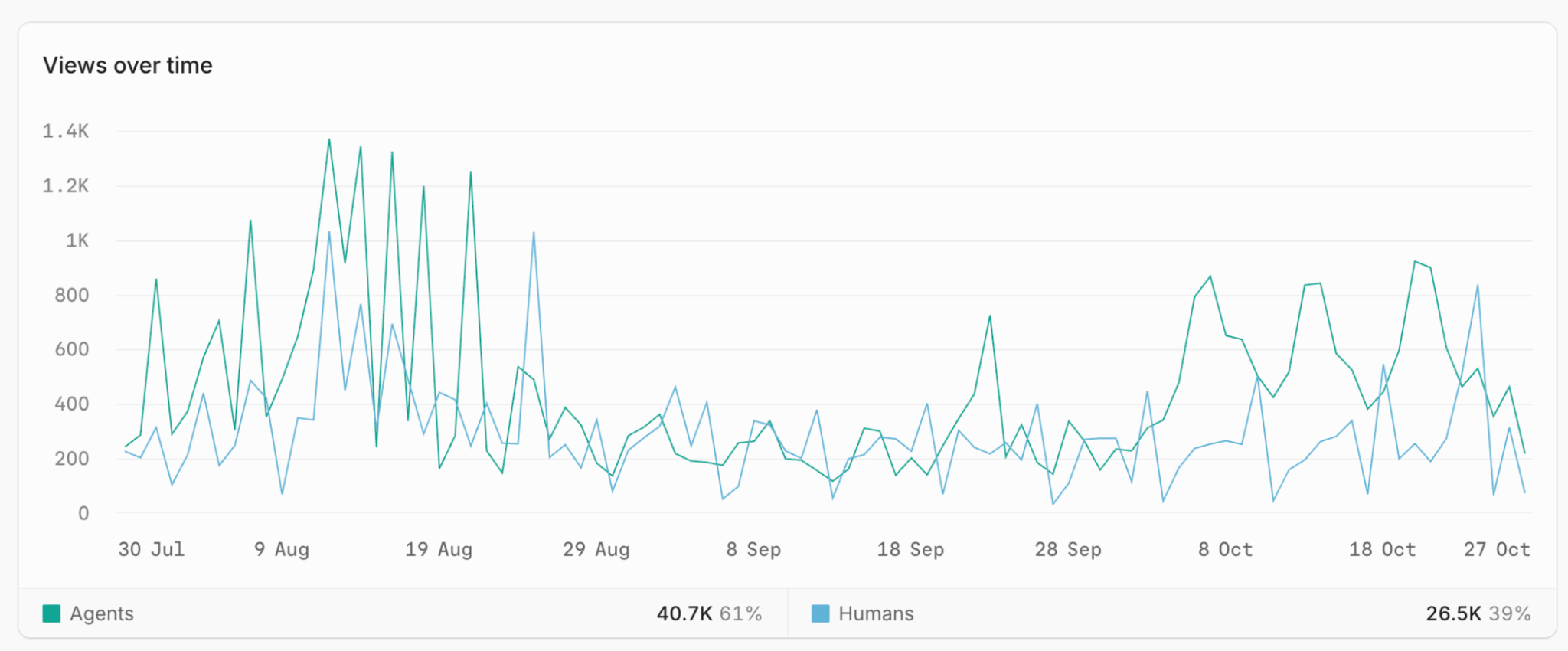
The same pages are also served as Markdown at the matching .md path and curated into llms.txt, so an agent that prefers plain text still reads the same source a partner sees in the browser.
A person who spots an outdated SDK version number will usually check the changelog before copying it into code. An AI coding agent writes it straight into the application. That makes documentation accuracy a primary driver of partner integration velocity, which is what we care about most on the Platform side.
Four layers, so no single check has to be perfect
We treat our documentation like a software codebase, with a build pipeline, a test suite, and a deploy step. The system works in four distinct layers so that a mistake slipping past one guardrail is caught by the next.
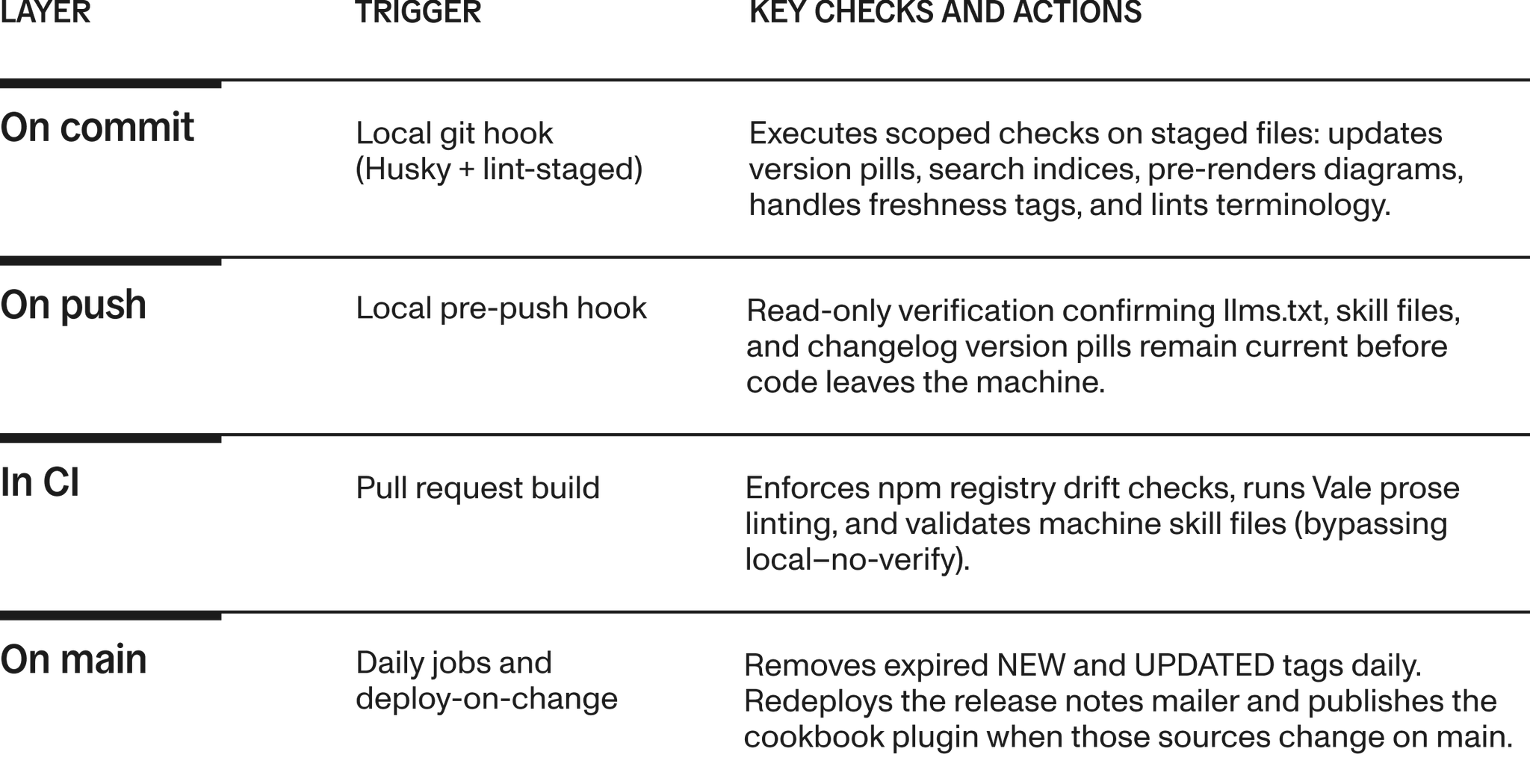
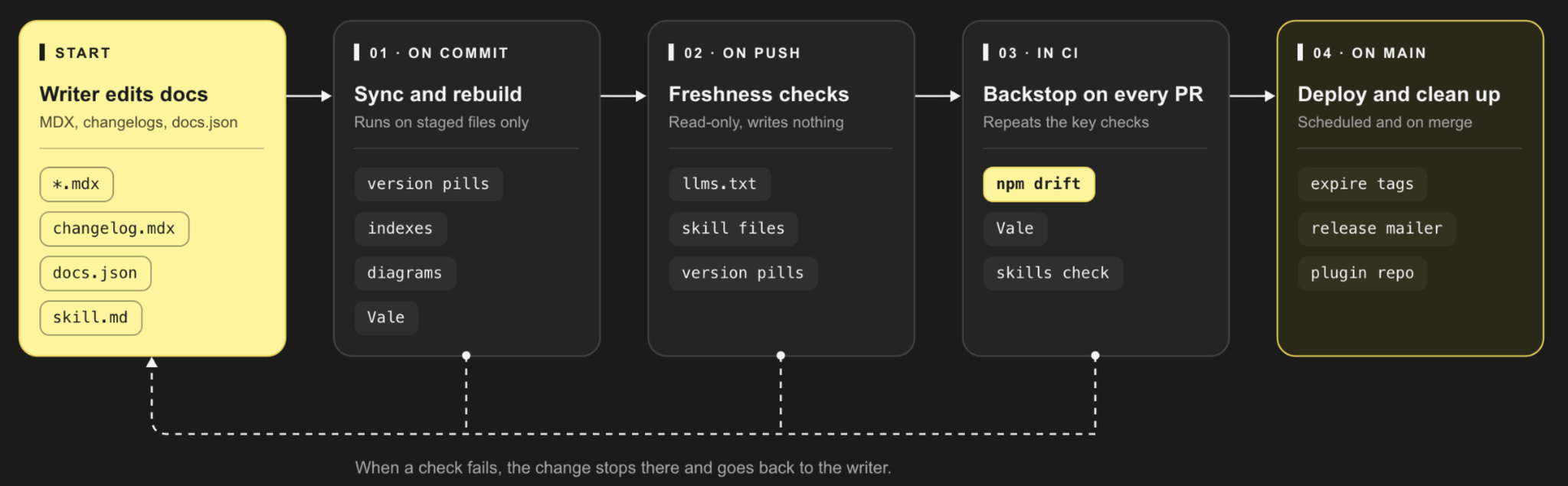
Keeping versions honest where it matters most
The drift that hurts a partner most is a documented version that does not match the package they just installed. So our strictest check is built around it. It compares our changelogs directly against the npm registry for four SDK product lines: Web, Headless, Dictation, and Form filling.
This check runs on every pull request and every weekday on a schedule, ensuring drift never sits unnoticed for long. It has natural boundaries: APIs and SDKs without npm packages (such as the Ambient API, Mobile SDK, and Form filling API) have no registry to query, so we track those through product changelogs and release notes instead.
When a release happens, version pills must also update on the Changelogs page, in the "Stay updated" cards on SDK overview pages, and in the SDK tab navigation. We used to chase those three places by hand after every changelog edit. A single script now syncs all of them whenever a changelog is staged, so the commit does the remembering.
Pages that maintain themselves
Generated files that nobody edits by hand
A surprising amount of what makes the site feel complete is generated automatically. Every generated file follows one strict rule: a build command produces it, a check command verifies it without modifying anything, and nobody edits the file by hand.
The glossary index and FAQ index behind the Docs Assistant rebuild whenever those source pages change. llms.txt is rebuilt on commit from docs.json and page frontmatter. Homepage counts, menu badges, and quick-summary dates are refreshed by scripts, so none of those numbers depend on someone noticing that it changed.
Tags that expire on their own
NEW and UPDATED tags stay in the sidebar for 30 days. The commit hook tags new pages added to navigation, a writer marks a meaningful update with a single command, and a daily job removes whatever has expired. A tag that never expires teaches readers to ignore tags, causing the ones that matter to stop working too.
Diagrams and terminology
Diagrams ship as static light and dark SVGs rather than live Mermaid charts. They look identical in both browser themes and stay readable to systems that cannot run scripts, while the Mermaid source remains embedded in the page for coding agents.
If a chart is stale, the commit hook rebuilds it automatically. A separate check catches SVGs with HTML labels, which Mintlify's CDN strips into blank boxes on the live site. For text consistency, we run Vale with Suki-specific rules and a shared vocabulary for product names and clinical terms. An inconsistent "Form filling" is caught by a linter before reaching human review.
Documentation for machines gets the same care
The files we publish for machines get the same discipline as the pages we publish for people. The skill.md files, Code Mode skills, agent prompts, and cookbook plugin all have generated regions between marker comments that nobody edits manually. Those regions sync from the same guides partners read on the site, so a fix to a page lands in the skill files with it, and humans and agents stay on one source of truth. One build command syncs them and refreshes their source digests, while a read-only check fails on push and in CI whenever any section is stale.
The Docs Assistant is treated as a product in its own right. Its source code lives in small files, and the shipped bundle is rebuilt whenever that source changes. Browser regression and end-to-end test suites catch regressions before they ship if a docs redesign quietly breaks assistant queries.
Automation that still asks a person
None of this removes people from the process, and we did not want it to. When someone asks the editor agent to commit or push, it does not simply run git. It executes the npm drift check, runs Vale on staged MDX files, and reviews the diff against our style guide. When navigation or links change, it also runs Mintlify validation and a broken-link check.
Then it posts a single pre-commit checklist and waits for human approval. The repetitive work of remembering to run every check belongs to the agent, while judging whether a page is clear, correct, and ready to ship stays with a person.
What we learned along the way
Three habits made the system work:
- Pair every build with a check-only twin: Every generated file gets a zero-side-effect validation command so CI can check integrity anywhere without modifying state.
- Catch drift where it starts: Place checks as close to the author as possible. A stale version pill gets caught in seconds at commit time rather than days later in a partner support ticket, with CI acting as the backstop.
- Maintain a single source of truth for automation: Document all pipeline scripts in one maintainer checklist so scripts never turn into forgotten debt.
Suki's mission is to make healthcare technology invisible and assistive. Ambient intelligence works because it fits into the exam room as it already exists. We want the same for developers: documentation they never have to double-check, whether they read it on the website or through an AI agent in their editor.
Nobody notices this system when it works, and that is the point. We are building toward a documentation set that stays correct on its own, so writers can spend their time on clarity and examples while partners spend theirs on shipping.
To see how it reads from inside your own tools, connect your coding assistant directly:
Harshit Satyaseel, Sr. Doc Engineer
Related Resources
September 1, 2026
Science at Suki: Bringing scientific rigor to Ambient Clinical Intelligence
August 13, 2026
Ambient intelligence for engineers: Why we made Suki's platform native to AI development tools with MCP
June 10, 2026